O que é um arquivo vetorial em termos mais simples? (O projeto versus a foto)
Vamos começar com uma resposta simples e direta. UM arquivo vetorial é uma ilustração digital feita de linhas matemáticas, pontos e curvas em vez de pixels. Por ser baseado em fórmulas matemáticas, pode ser dimensionado para qualquer tamanho – desde um pequeno alfinete até um outdoor gigante – sem nunca perder qualidade ou ficar desfocado. É o padrão da indústria para qualquer tipo de impressão ou fabricação de alta qualidade.
A maneira mais fácil de entender isso é por meio de uma analogia: a planta versus a fotografia.
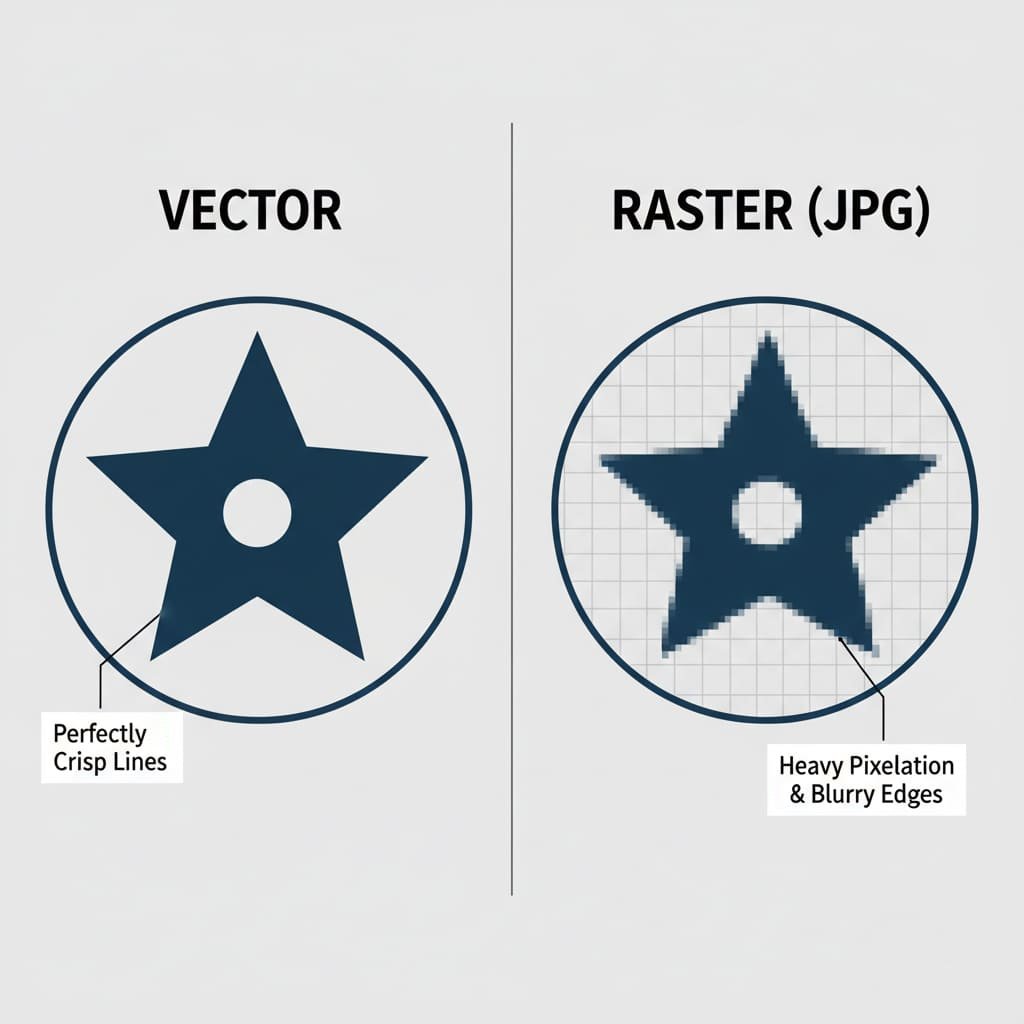
- UM Arquivo vetorial é como um projeto. É um conjunto de instruções precisas. Ele diz ao computador: “desenhe um círculo perfeito aqui com este diâmetro” e “desenhe uma linha perfeitamente reta deste ponto até aquele ponto”. A máquina CNC de uma fábrica pode ler estas instruções exatas para cortar um molde de metal perfeito para o seu pino.
- UM Arquivo raster (como JPG ou PNG) é como uma fotografia da planta. É um instantâneo feito de milhares de pequenos quadrados coloridos (pixels). À distância, parece ótimo. Mas se você aproximar muito o zoom, tudo o que verá serão os quadrados individuais, e as bordas ficarão borradas e irregulares. Uma máquina não consegue ler esta imagem difusa para criar um molde limpo e nítido.
Por que a arte vetorial é absolutamente essencial para fazer alfinetes de esmalte?
A necessidade de arte vetorial não é apenas uma preferência; é um requisito físico do processo de fabricação. A qualidade do seu pin final está diretamente ligada à qualidade do arquivo vetorial usado para criá-lo.
- Ele cria o molde: A primeira etapa na produção é criar um molde de aço personalizado com seu projeto. Uma máquina de gravação controlada por computador usa caminhos superprecisos do arquivo vetorial para gravar o desenho no metal. Linhas limpas na lima equivalem a linhas limpas e nítidas no molde. Um JPG borrado resultaria em um molde confuso e impreciso.
- Define as cores: The vector file creates the separate, enclosed “pools” that will be filled with enamel paint. The clean metal borders are critical to prevent different colors from bleeding into one another.
- It Allows for Perfect Scaling: Your design needs to be scaled to the exact production dimensions (e.g., 1.25 inches). Vector art allows our team to do this with perfect precision, ensuring every detail is proportional.
Vector vs. Raster Comparison Table
Key Differences: Vector vs. Raster Graphics
| Recurso | Vector Graphics | Raster Graphics (JPG, PNG, GIF) |
|---|---|---|
| Made Of | Mathematical Paths, Lines, & Curves | A Grid of Colored Pixels |
| Escalabilidade | Infinitely scalable without any quality loss. | Loses quality and becomes blurry when enlarged. |
| Common File Formats | .AI, .EPS, .SVG, .PDF (from vector software) | .JPG, .PNG, .GIF, .TIFF, .BMP |
| Melhor para | Logos, Illustrations, Pin Designs | Photographs, Detailed Digital Paintings |
| Why for Pins? | Required. Creates the clean, precise lines needed for the metal mold. | Not Directly Usable. Blurry edges create a messy, inaccurate mold. |
The “Factory-Ready” File: What We Actually Need
When a manufacturer asks for a “factory-ready” or “production-ready” file, they are looking for a vector file that meets a few specific technical requirements. Understanding these will help you communicate with any manufacturer like a pro.
The Official Checklist:
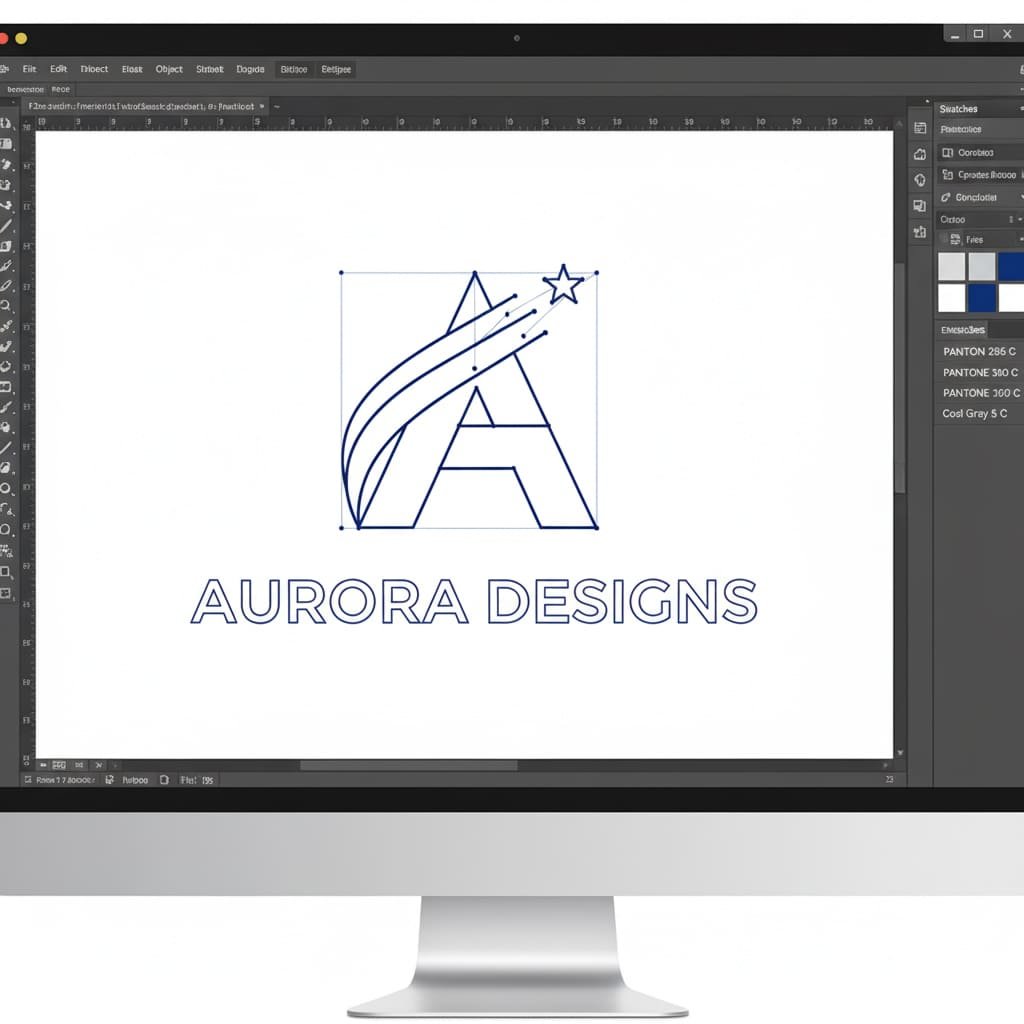
- Correct File Format: The file should be saved in one of the standard vector formats. The most common and preferred are
.AI(Adobe Illustrator) and.EPS. Other excellent formats include.PDF(when saved correctly from vector software) and.SVG. - All Text Converted to Outlines: This is a critical step. If you use a font in your design that our designers don’t have installed, their computer will automatically substitute it with a different one, which can ruin your layout. “Converting to outlines” is a final command in vector software that “locks” the text into a permanent shape. This ensures your typography looks exactly as you intended.
- Solid Pantone (PMS) Colors: Your file should specify the exact Pantone Solid Coated codes for each color area. This is the universal language for color in manufacturing and guarantees accuracy. For a deeper understanding of this crucial step, please read our guide on why Pantone matching is critical. Remember, gradients and shading are not possible for enamel pins, so only solid colors should be used.
- Clearly Defined Metal Lines: As mentioned, every color area must be completely enclosed by a metal line. The file should look like a clean coloring book page, with no gaps in the outlines.
I’m Not a Designer. What Are My Options?
This is the most important question for most of our clients. You have a great idea, but you don’t have the software or the skills to create a technical vector file. Don’t worry. You have several excellent, easy options.
Path 1: The Easiest Path – Let Our Experts Do It for Free
This is the simplest, most popular, and completely risk-free solution. Our entire business is built on making this process easy for you. You provide the idea, and we handle all the technical artwork for you.
What You Can Provide Us (Literally Anything):
- A Hand-Drawn Sketch: Have an idea on a napkin? A drawing in a notebook? Perfect. Take a clear photo with your phone and send it to us.
- A Low-Resolution JPG/PNG File: Have a company logo, a piece of digital art, or an image you found online that you want to adapt? No problem. Send us the highest-quality version you have.
- Just a Description: Don’t have a drawing at all? Just describe your vision to us in an email. Our professional artists are experts at turning written ideas into beautiful visual designs.
What We Do (Our Free, All-Inclusive Design Service):
Once we have your concept, our professional design team gets to work. They will manually redraw your concept as a perfect, clean, production-ready vector file, making sure it adheres to all the critical manufacturing rules for line thickness and color separation. We then send you a professional digital proof (a high-quality mockup) for your approval. You can request as many changes as you need, and we offer **unlimited revisions** until you are 100% happy with the design. This entire service is **completely free** and comes with no obligation to order.
Path 2: The DIY Approach – Tools You Can Use
If you’re feeling adventurous and want to try creating your own simple vector file, it’s more accessible than ever. Here are a few tools you can use:
- Free Software (Inkscape): Inkscape is a powerful, free, and open-source alternative to Adobe Illustrator. It has full vector capabilities but can have a steeper learning curve for complete beginners.
- Web-Based Software (Vectr, Canva): These browser-based tools are very user-friendly. While some of their advanced vector export features might be part of a paid plan, they are great for creating simple shapes and text.
Path 3: The Professional Path – Hiring a Freelance Designer
If your project is highly complex, part of a larger branding initiative, or you simply want to work with a specific artist, hiring a freelance designer is a great option. You can find talented designers on platforms like Upwork, Fiverr, or 99designs.
When hiring a freelancer, give them this exact instruction: ‘I need a factory-ready vector file for an enamel pin. The final file should be in .AI or .EPS format, with all text converted to outlines, and all colors specified as Pantone Solid Coated.’ This will ensure you get exactly what a manufacturer needs.
Common Artwork Issues and Solutions
| Your Problem | The Simple Solution |
|---|---|
| “My logo is a JPG/PNG file. Can you use it?” | Yes! While we can’t use it directly for the mold, our artists will use your file as a perfect reference to professionally redraw it as a clean vector file. This is a core part of our free design service. |
| “My design has gradients, shading, or a photograph.” | Para um alfinete de esmalte tradicional, esses efeitos não funcionarão. Oferecemos duas ótimas soluções: 1) Nossos designers podem ajudá-lo a simplificar o design, convertendo habilmente os gradientes em lindas cores sólidas. 2) Podemos produzir seu design como um Pin Impresso, que reproduz perfeitamente os detalhes fotográficos. |
| “A prova que você enviou parece diferente da minha arte original.” | Esta é uma parte normal e muito importante do processo! Geralmente acontece por motivos técnicos, como linhas muito finas ou texto muito pequeno. Um bom fabricante explicará o que mudou e por quê. Este é um sinal de que um parceiro especialista ajuda você a criar um produto final melhor. |
| “Por que há linhas pretas grossas em todo o meu design na prova?” | Those lines represent the raised metal that will separate the colors. They might look prominent on a digital screen, but on the final, small pin, they will look proportional and are essential for a clean result. For more guidance, see our 10 dicas críticas de design para alfinetes. |
Your Jargon-Busting Glossary of Vector Terms
This industry is full of technical terms. Here’s a simple, jargon-free glossary to help you understand the language.
- AI File (.ai): The native file format for Adobe Illustrator, the industry-standard vector design program.
- Convert to Outlines: A command in vector software that turns editable text into permanent shapes, preventing font errors.
- Die Lines: The raised metal lines on a pin that form the outline of the design and separate the colors.
- DPI (pontos por polegada): Uma medida de resolução para imagens rasterizadas (baseadas em pixels). 300 DPI é considerado alta resolução para impressão.
- EPS (PostScript encapsulado): Um formato de arquivo vetorial comum que é compatível com uma ampla variedade de softwares de design.
- JPG/JPEG: Um formato de imagem raster comum, melhor usado para fotografias. Ele usa compactação com “perdas”, o que significa que perde qualidade cada vez que é salvo.
- Maquete / Prova: Uma imagem digital fornecida pelo fabricante que mostra a aparência do seu alfinete final.
- Pantone (PMS): Um sistema padronizado de correspondência de cores usado na fabricação para garantir uma reprodução de cores precisa e consistente.
- Pixel: Um único pequeno quadrado colorido que é o menor bloco de construção de uma imagem raster.
- PNG: A raster image format that is great for web graphics because it supports transparent backgrounds.
- Raster: Any image made from a grid of pixels. It cannot be scaled without losing quality.
- SVG (Scalable Vector Graphics): A vector file format that is popular for web use because it can be scaled within a browser.
- Vector: Any image made from mathematical paths. It can be scaled infinitely without losing quality.
You’re Ready to Go!
You now have all the knowledge you need to confidently tackle the artwork for your custom enamel pin project. A clean vector file is the essential blueprint for a high-quality product, but you don’t need to be a professional designer to get one.
Ao compreender esses conceitos básicos e fazer parceria com um fabricante especializado, você pode garantir que sua visão criativa seja perfeitamente traduzida em um design impressionante pronto para fábrica. Os detalhes técnicos são nosso trabalho; seu trabalho é trazer grandes ideias.